SMS Opt-In Evidence
Program: Shift Health Account Notifications · Brand: Shift Health · Use case: Low Volume Mixed (transactional healthcare)
This page documents, with annotated screenshots, exactly how end users consent to receive transactional SMS messages from Shift Health. It is published for A2P 10DLC carrier reviewer verification.
Shift Health is a HIPAA-regulated telehealth platform serving both patients and licensed healthcare providers. Phone-number collection happens after initial account creation, on three web forms — patient intake, patient account profile, and provider onboarding — all behind authentication for healthcare-privacy reasons. All three forms render the same inline SMS consent disclosure directly beneath the phone input field. This evidence page makes the consent surfaces independently verifiable without requiring reviewer credentials.
Opt-in keywords: N/A
Shift Health does not support SMS keyword opt-in. All opt-ins occur on the website (joinshift.health), at the point of mobile-number collection, with the full consent disclosure displayed in plain text directly beneath the phone field. The exact on-screen disclosure text shown to every user before submission is:
Summary
| Program name | Shift Health Account Notifications |
|---|---|
| Message type | Transactional only — no marketing or promotional content |
| Message categories | One-time verification codes, appointment reminders, secure-message notifications, on-call provider alerts, account/security alerts |
| Opt-in surfaces | (1) Mobile phone step in patient intake at /intake. (2) Phone field on patient profile Account tab at /portal/profile. (3) Phone-verify step in provider onboarding at /onboarding/provider (clinicians joining the platform — receives on-call patient-waiting alerts). |
| Opt-in action | User enters mobile number into the phone field, sees the inline SMS consent disclosure directly under the field, and submits the form. Submission constitutes opt-in. The exact disclosure paragraph is identical on all three surfaces (rendered from a single shared UI component). |
| Opt-out | Reply STOP to any message (Twilio Advanced Opt-Out enabled). Users may also remove or change their phone number in account settings at any time. |
| Help | Reply HELP to any message, or contact support@joinshift.health. |
| Frequency | Varies based on account activity, care received, and notification settings. |
| Costs | Message and data rates may apply per the user's mobile carrier. Shift Health does not charge for SMS. |
| PHI in SMS | SMS messages do not contain PHI. When sensitive information must be communicated, the SMS directs the user to log in to the platform. |
| Third-party sharing | No mobile information, SMS opt-in data, or consent data is shared with third parties or affiliates for any purpose, including marketing or promotional purposes. Mobile information is shared only with the messaging service provider strictly necessary to deliver the messages. |
| Public policies | SMS Terms · Privacy Policy · Terms of Service |
1Account creation
End users first create an account at https://joinshift.health/signup. This step collects email, password, and state. No SMS opt-in occurs at this step. Phone number is intentionally not requested until after account creation, both for healthcare-privacy reasons and to avoid pressuring patients to share their mobile number before they have evaluated the platform.
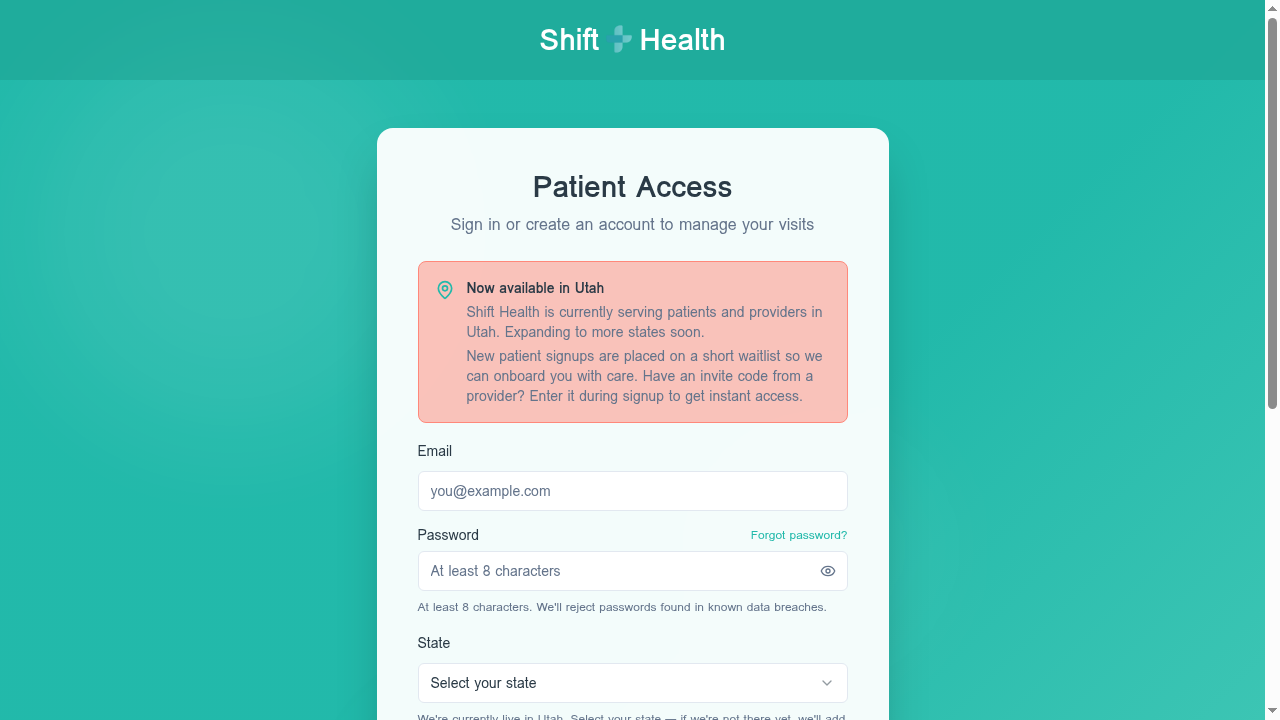
/signup. Collects email, password, state. No SMS opt-in here.2Mobile phone collection during intake
Once the user has created an account and begins their first visit, the patient intake flow asks for a mobile phone number for transactional notifications. The full SMS consent disclosure appears directly beneath the phone input field, before the user can advance.
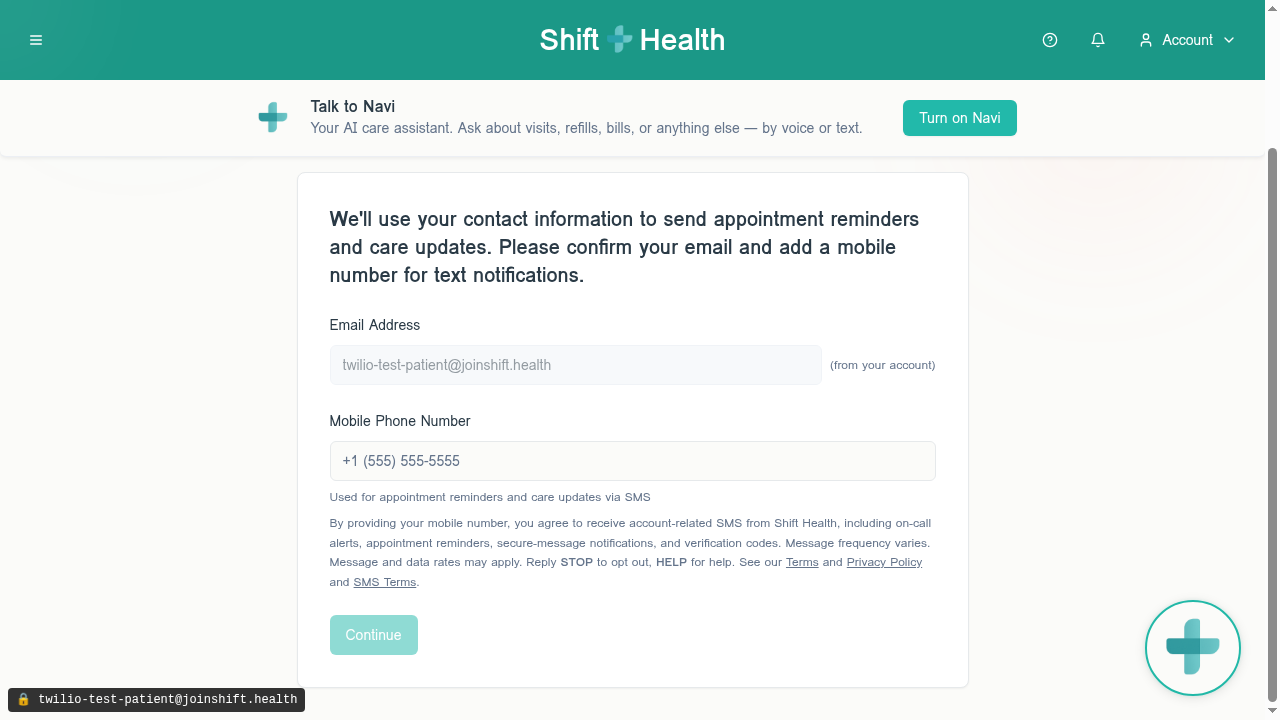
Exact disclosure text shown at this step
The user must enter a valid E.164-formatted phone number and tap Continue to advance. Tapping Continue with a phone number entered constitutes opt-in.
3Phone editing in patient profile
Outside of intake, users can add, change, or remove their mobile number at any time on the Account tab of their profile at /portal/profile. The same SMS consent disclosure appears directly beneath the phone field.
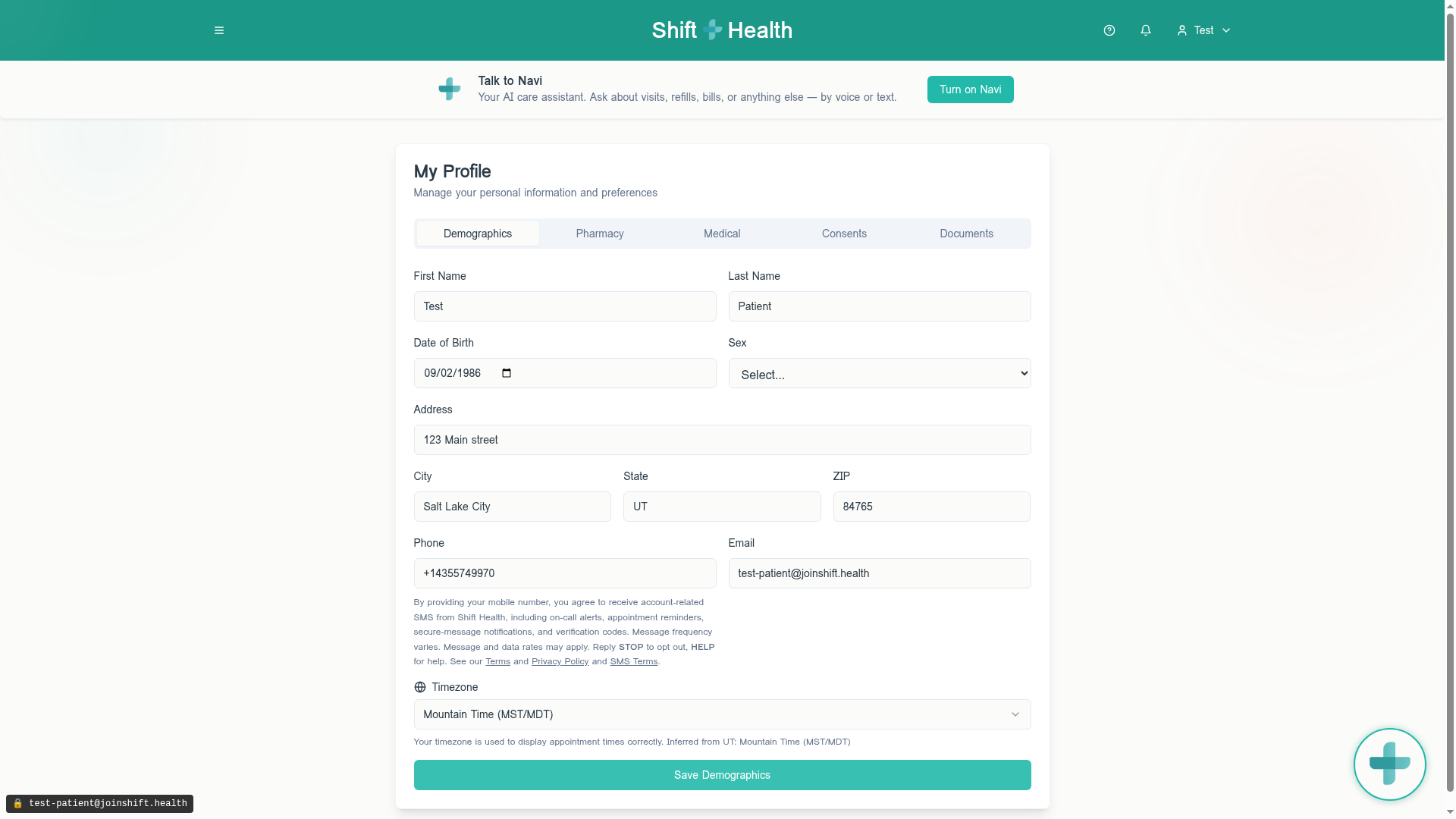
/portal/profile. Same inline disclosure as Step 2.Removing the phone number and saving the profile is one of the supported opt-out methods, in addition to replying STOP to any SMS.
4Provider onboarding — phone collection
Licensed healthcare providers who join Shift Health complete a separate onboarding flow at /onboarding/provider. The phone-verify step collects the provider's mobile number so the platform can send on-call patient-waiting alerts, appointment reminders, and security/verification codes. The same inline SMS consent disclosure is rendered directly beneath the phone input (from the same shared SmsConsentNotice UI component used on the patient surfaces), so the disclosure text cannot drift between surfaces.
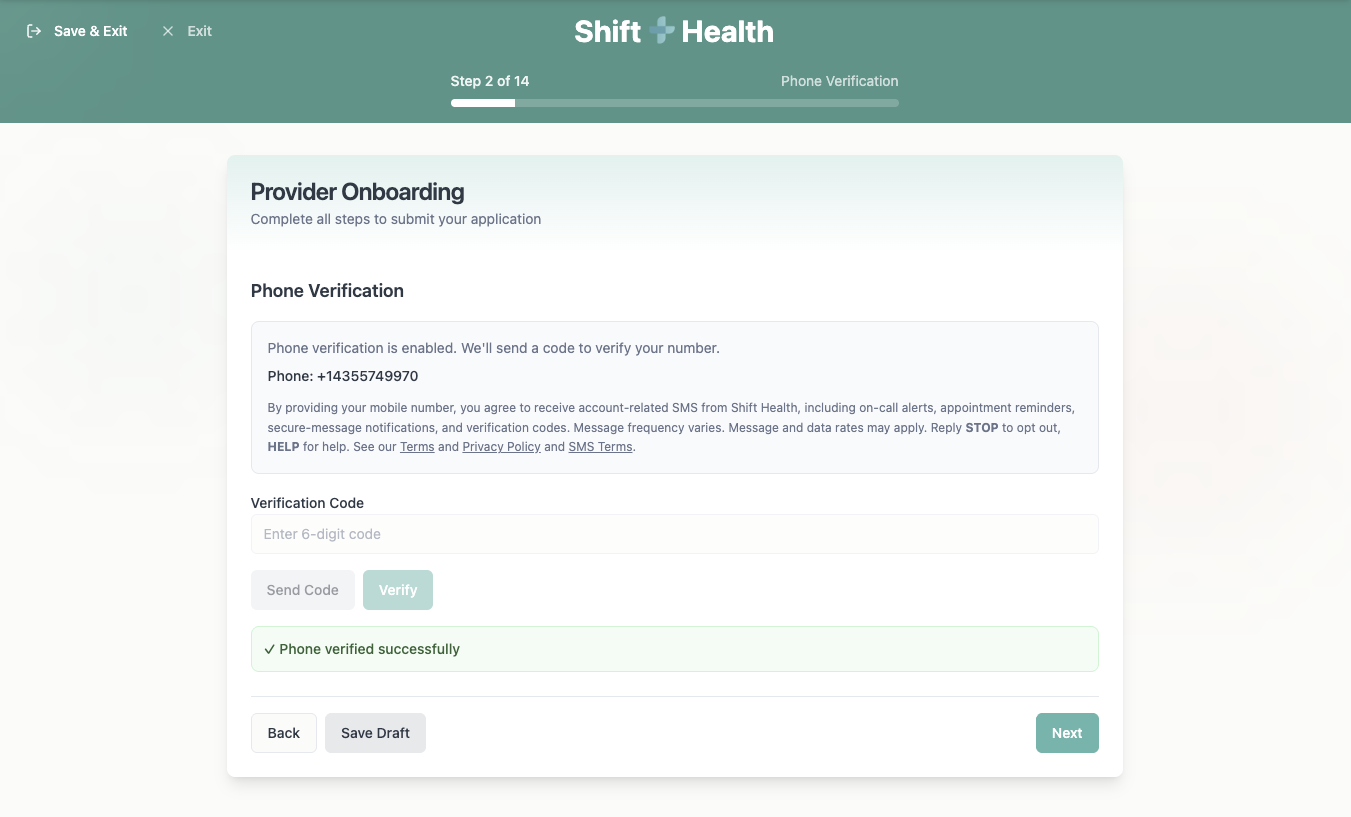
/onboarding/provider. Same inline disclosure paragraph as Steps 2 and 3.Exact disclosure text shown at this step
The provider must enter a valid US mobile number, receive a one-time verification code via SMS, and enter the code to advance. Submitting the phone number with the disclosure visible constitutes opt-in.
5Consent management
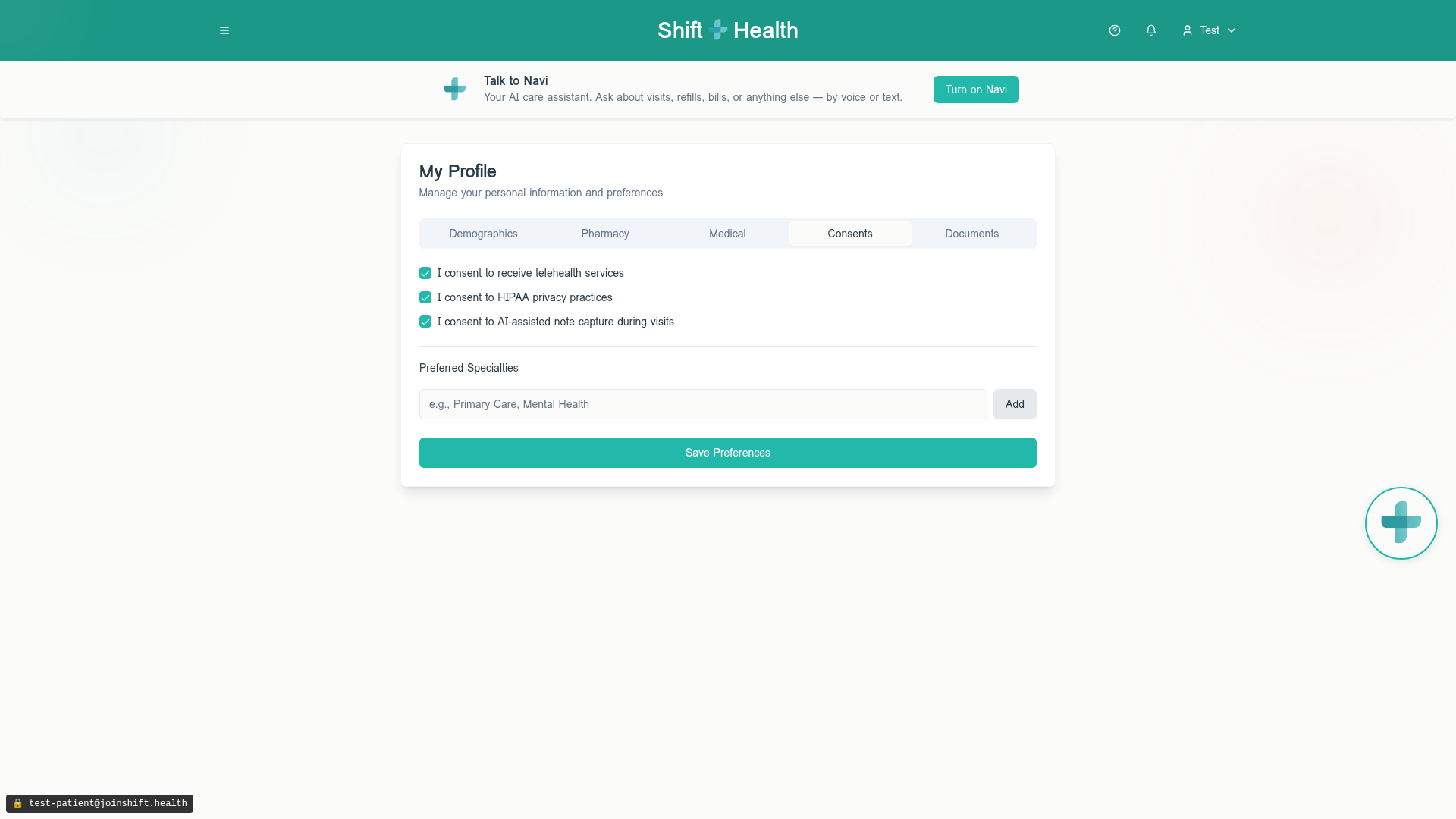
The Consents tab of the patient profile lets users review and manage their telehealth, HIPAA, and AI-note-capture consents. SMS consent itself is governed by the inline disclosure at the point of phone collection (Steps 2 and 3) and by the public SMS Terms.
6Opt-out and help behavior
Opt-out and help keywords are managed by Twilio's Advanced Opt-Out feature on the underlying Messaging Service. Behavior:
- STOP (or
OPTOUT,CANCEL,END,QUIT,UNSUBSCRIBE,REVOKE,STOPALL) — User receives one confirmation message and is unsubscribed from that number. Confirmation text: "You have successfully been unsubscribed. You will not receive any more messages from this number. Reply START to resubscribe." - HELP (or
INFO) — User receives: "Reply STOP to unsubscribe. Msg&Data Rates May Apply." - START — User is resubscribed.
In addition, users can remove their phone number from their account profile at any time, which prevents Shift Health from sending any further transactional SMS to that number.
Sample messages
All transactional messages sent under this campaign are prefixed with the brand name Shift Health and include opt-out instructions. Examples:
- Shift Health: A patient is waiting for you. Open the provider dashboard to respond: https://joinshift.health/provider-dashboard Reply STOP to opt out.
- Shift Health: This is a test notification confirming your on-call alerts are working. No action needed. Reply STOP to opt out.
- Shift Health: Reminder — your scheduled visit begins in 15 minutes. Join here: https://joinshift.health/visit Reply STOP to opt out.
- Shift Health: You have a new secure message from your care team. Log in to view: https://joinshift.health Reply STOP to opt out.
- Shift Health: Your verification code is 123456. It expires in 10 minutes. Do not share this code. Reply STOP to opt out.
Contact
For questions about this campaign or any item on this page:
- Email: support@joinshift.health
- Phone: (435) 574-9970
- Web: https://joinshift.health